
Setting up a new campaign in the Supporter Gateway is quick and efficient, especially if your Default Profile is already filled out. When you create a campaign, all text content and images from your Default Profile will automatically populate the campaign profile, ensuring a consistent look and feel.

Steps to Create a Campaign
- Enter a Campaign Name – Choose a clear and engaging title for your campaign.
- Set a Fundraising Goal – Define the target amount you aim to raise.
- Choose an End Date (Optional) – If left blank, the campaign will run indefinitely.
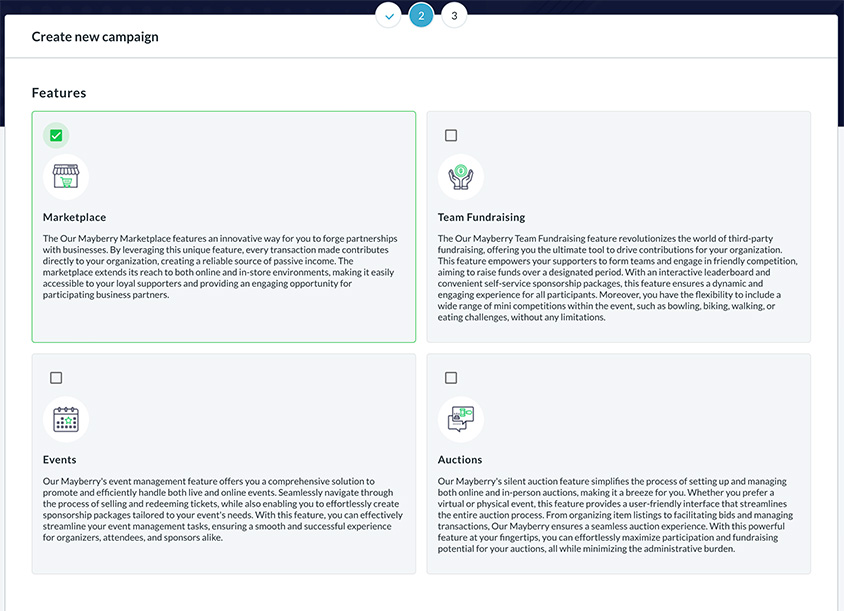
- Select Fundraising Features – Add the fundraising tools you want to include in this campaign.
Fundraising Features & Duplication
Each campaign can include multiple fundraising features, such as:
- Event Ticketing – Sell tickets and manage fundraising events.
- Peer-to-Peer Team Fundraising – Allow supporters to create and compete in fundraising teams.
- Impact Marketplace (eCommerce Fundraising) – Offer products where every purchase contributes to the charity.
- Gift Card Fundraising – Provide access to over 400 brand-name digital gift cards, generating 1%–6% in contributions per purchase.
- Local Business Partnerships – Enable businesses to support fundraising efforts with customized contributions.
- Donation Form Management – Set up custom donation buttons and forms to accept direct contributions.
One of the powerful aspects of the Supporter Gateway is that any fundraising feature can be duplicated within a campaign. This allows you to manage multiple instances of the same feature under a single campaign.
Examples of Feature Duplication
- If you host an event and later want to run another similar event, simply click the “Duplicate” button in the Event Ticketing section. This creates a new event while keeping all campaign details intact.
- If you are running a Team Fundraising competition and want to start a new round, you can duplicate the feature instead of setting it up from scratch.
- If you want multiple donation forms for different purposes within the same campaign, you can create and manage multiple versions.
Note: The campaign’s main fundraising page will display cumulative fundraising totals from all fundraising features within that campaign. This means past contributions from duplicated events or fundraisers will still be reflected in the overall campaign total.
The Supporter Gateway provides flexibility and control, making it easy to expand your campaign without the hassle of recreating features from the ground up.