
🎁 Gift Card Section
Create custom gift card options your customers can buy and redeem online or in-store — all while supporting causes you care about.
The Gift Card section allows your business to create and manage digital gift cards that customers can purchase through your Our Mayberry storefront and in any Impact Marketplace you are partnered with.
Gift cards are a powerful way to:
- Bring in new customers
- Increase repeat business
- Offer flexible purchasing options
- Generate contributions automatically
- Expand visibility through multiple Marketplaces
Once created, your gift cards appear instantly in the Gift Card Section of every Impact Marketplace you’re partnered with — no extra steps required.
1. What You Can Do in the Gift Card Section
From this section, you can:
✔ Create custom gift card denominations
(Example: $10, $25, $50, $100, $200 — or any amount you choose)
✔ Set the contribution percentage
This determines how much of each gift card sale supports a cause.
✔ Choose whether the gift card is currently available for customers
(You can turn gift cards on or off at any time.)
✔ Have gift cards appear across all your Marketplace partnerships
Gift cards are included automatically — no duplicate creation needed.
2. Setting Up Gift Card Denominations
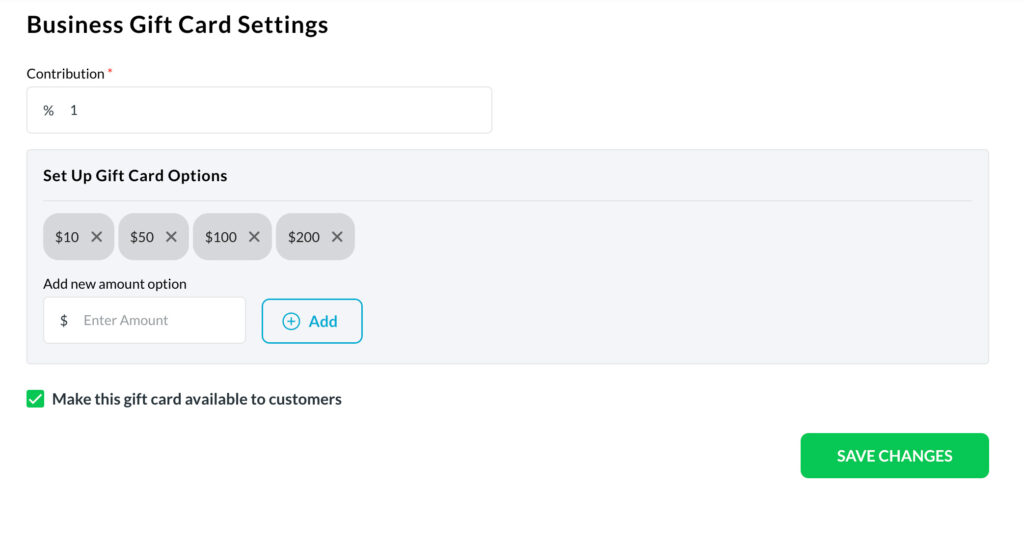
The Gift Card section provides default options such as:
- $10
- $50
- $100
- $200
You can remove any option OR add your own custom values.
To add a new denomination:
- Enter a dollar amount in the Add new amount option box.
- Click Add.
- The new amount appears immediately as a purchasable option.
You can add as many denominations as you want.
3. Setting the Contribution Percentage
At the top of the Gift Card settings is the Contribution (%) field.
This determines how much of the gift card purchase goes to the nonprofit or fundraiser selected by the customer.
Examples:
- A 1% contribution on a $100 gift card generates $1.00 for the cause.
- A 10% contribution on a $50 card generates $5.00.
This contribution applies to every gift card purchased in your storefront and in all partnered Marketplaces.
4. Making the Gift Card Available or Unavailable
At the bottom of the page, you’ll find:
☑️ Make this gift card available to customers
If this box is checked:
- Your gift cards will appear in your storefront
- They will appear in all partnered Impact Marketplaces
- Customers can purchase them at any time
If you uncheck this box:
- Gift cards are hidden from customers
- No one can buy them until you activate them again
This gives you complete control over seasonal offers, promotions, or inventory periods.
5. How Customers Redeem Gift Cards
Gift cards purchased through Our Mayberry can be redeemed:
✔ Online
Customers can redeem their gift card balance on:
- Any offer you sell
- WooCommerce items you’ve imported
- Donations or impact-based products
- Your business storefront
✔ In-Store
If a customer wants to use a gift card in person:
- You can accept it through your Payment QR system
- Or through manual entry in the Transactions section
- The system automatically deducts the redeemed amount from their balance
All gift card redemptions are tracked in your:
- Transactions section
- Reports → Gift Card tab
This includes:
- Remaining balance
- Contribution generated
- Redemption date
- Purchase history
6. How Gift Cards Work With Impact Marketplaces
Once you create gift cards:
✔ They automatically appear in every Marketplace you partner with
This includes Rotary clubs, foundations, nonprofits, districts, and community causes.
✔ Marketplace supporters can buy your gift cards
Their purchases generate contributions for the cause they support.
✔ No extra setup is needed
Create the card once — the platform handles the rest.
7. Why Gift Cards Matter for Your Business
Gift cards help you:
✔ Drive new customer acquisition
✔ Increase repeat purchases
✔ Boost revenue through upfront gift card sales
✔ Make your business visible across multiple Impact Marketplaces
✔ Generate contributions automatically
✔ Offer a flexible product that fits any occasion
They are one of the most effective ways to increase both impact and revenue at the same time.
8. Summary
The Gift Card section:
- Gives you full control over gift card amounts
- Lets you set a contribution percentage
- Allows gift cards to appear in every Marketplace you partner with
- Enables easy online and in-store redemption
- Tracks everything for you
- Helps your business grow while supporting causes
It’s simple, powerful, and designed to help you expand your reach effortlessly.