📊 Your Our Mayberry Business Dashboard
A simple, powerful snapshot of your business activity and impact
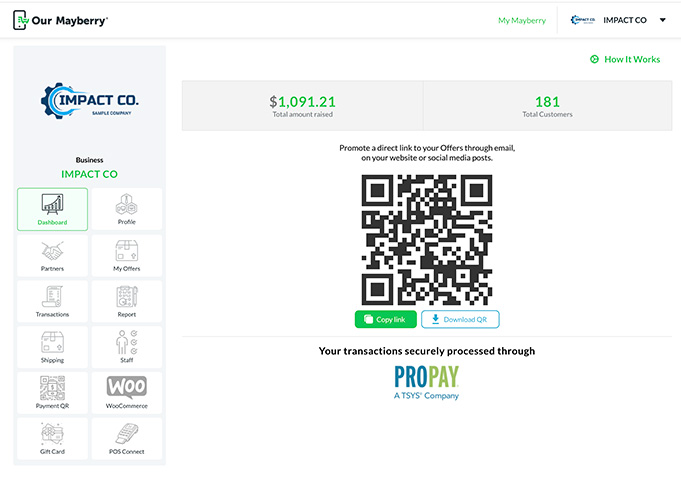
The Dashboard is the first page you’ll see every time you log in to your Our Mayberry business account. It’s designed to give you a clean, real-time overview of how your business is performing inside the platform — including your contributions, your customers, and quick tools to help you grow.
Below is a breakdown of each section of your Dashboard and what it means for you.
1. Total Amount Raised (Your Impact)
At the very top of your Dashboard, you’ll see a large number labeled Total Amount Raised.
This is your business’s total charitable impact — the amount of money contributed to nonprofits and fundraisers through:
- QR code payments you’ve enabled
- Invoice payments sent through Our Mayberry
- Purchases or offers connected to fundraising campaigns
- Any other contribution-enabled transactions
This number updates automatically and gives you an instant view of the good your business is doing in the community.
2. Total Customers
Next to your impact, you’ll see Total Customers.
This count represents the number of customers who have interacted with your business through Our Mayberry, including:
- People who paid using one of your special QR codes
- Customers who purchased your offers or gift cards
- Supporters who selected your business while participating in a fundraiser
- Clients who paid invoices through the platform
This helps you track how your reach and customer engagement are growing over time.
3. Your Business QR Code (Quick Access to Your Offers)
In the center of your Dashboard, you’ll see a large QR code.
This QR code links directly to your business offerings page in the Impact Marketplace — making it easy for customers to find your:
- Offers
- Gift cards
- In-store promotions
- Impact information
How to use it:
This QR code is designed to be shared anywhere your customers interact with you:
- At your front counter
- On menus or tables
- On printed flyers and posters
- On business cards
- On social media
- At fundraisers or events
Customers simply scan it with their smartphone and go straight to your online offerings.
Tools available:
Under the QR code are two buttons:
- Copy Link — Instantly copies the direct URL to your business page
- Download QR — Saves the QR code image so you can print or share it
This makes promoting your business incredibly easy.
4. Access to “How It Works”
In the top right corner of your Dashboard, you’ll see a link labeled How It Works.
Clicking this takes you to Our Mayberry’s official tutorials, which include:
- How to create and manage offers
- How the QR code payment system works
- How to send invoices through the platform
- How contributions are calculated
- How to partner with Marketplaces
- How customers purchase from you
These guides are always available and kept up-to-date so you can get help anytime you need it.
5. Payment Processor Information
At the bottom of your Dashboard, you’ll see a note that reads:
“Your transactions securely processed through PRO PAY, A TSYS Company”
This is simply confirming which payment processor is securely handling your transactions through Our Mayberry.
It ensures:
- Secure payment processing
- PCI compliance
- Fast and reliable deposits
- Protection for both you and your customers
Dashboard Summary
Your Dashboard gives you a clean, easy-to-read view of:
- Your total community impact
- Your growing customer base
- A ready-to-share QR code to your offerings
- Your direct link for marketing and social media
- Instant access to tutorials and guides
- Secure payment processing information
It’s designed to keep you informed and give you the tools you need to promote your business and grow your impact — all in one simple, friendly interface.